An ATS-friendly resume is not a document that has learned a secret way past hiring software. It is simply a resume that keeps its important text easy to extract, uses familiar structure, and shows how your real experience relates to the job.
That distinction matters because “ATS” covers many products and employer workflows. One system may use a resume to fill candidate-profile fields. Another may let a recruiter search the file for keywords. An employer may also configure application questions, screening rules, or an optional matching tool. None of those steps makes every resume pass through one universal score.
This guide explains what you can control: content, structure, file choice, keyword use, and a practical readability check before you apply.
What Is an Applicant Tracking System?
An applicant tracking system is recruiting software that helps an employer collect applications and manage candidates through a hiring process. The US Department of Labor’s Resume Essentials guide explains that an ATS can search resumes for keywords related to job requirements. ATS products may also store documents, organize candidate profiles, support communication, and track interview stages.
It helps to separate several functions that are often described as though they were the same thing:
| Function | What it can do | What it does not necessarily mean |
|---|---|---|
| File storage | Attaches your PDF or DOCX to an application | The file has been fully parsed |
| Resume parsing | Extracts details such as a name, contact information, employers, roles, dates, or skills | The system has judged whether you are qualified |
| Recruiter search | Finds candidates whose profiles or resumes contain selected words or phrases | Every employer uses the same search terms |
| Screening rules | Acts on answers to configured application questions | Formatting alone caused a rejection |
| Matching or ranking | Compares application information with employer-selected criteria when that feature is enabled | Every ATS ranks every candidate automatically |
| Human review | Lets a recruiter or hiring manager read the application and decide what happens next | Software made the final decision |
For example, Greenhouse documents resume parsing, full-text candidate search, and employer-configured auto-reject questions as separate features. Its optional Talent Matching feature is also described as assistive rather than automatic decision-making in the MyGreenhouse candidate FAQ. Other platforms and employer configurations differ.
How Does an ATS Work?
The exact sequence varies, but an online application commonly involves some of these steps.
- You submit the application. The employer receives the file plus any information entered into application fields.
- The system stores and may parse the resume. Parsing converts readable file content into text or structured fields. Lever, for example, says its parser can add details such as a candidate’s name, organization, and contact information to a profile in its resume parsing documentation.
- The employer reviews structured answers. Work authorization, location, licenses, or other job-specific questions may be reviewed or connected to employer-defined rules.
- Recruiters search, filter, or review. They may search parsed resume text, filter profile fields, sort an application queue, or read resumes directly.
- Optional tools may compare candidates with job criteria. Some products offer keyword matching, semantic matching, scores, or recommendations. Availability and use depend on the product, plan, employer, job, and local rules.
- People continue the hiring process. Recruiters and hiring managers review evidence, conduct interviews, and make decisions.
Parsing errors can still matter. If a role, date, or skill is missing from the extracted text, a recruiter may not find it in a search or may need to correct the profile manually. But a parsing problem is not proof that the ATS automatically rejected the application.
How to Create an ATS-Friendly Resume
Start with a resume that is easy for a person to understand. The same choices usually make the content easier for software to recover.
Use clear, familiar sections
Headings such as Summary, Experience, Education, Projects, Skills, and Certifications make the document easy to navigate. Creative headings such as “My Journey” or “What I Know” may sound distinctive, but they make readers work out what the section contains.
Keep related information together. For each job, show the role, employer, location if relevant, dates, and bullets as one visible group. Use a consistent date style throughout the resume.
Keep essential information as real text
Your name, email address, phone number, headings, dates, and skills should be selectable text—not text baked into an image. Decorative icons can support a label, but they should not replace the actual email address, phone number, or section heading.
Greenhouse lists images, text boxes, headers, footers, columns, and inconsistent sections among possible causes of a failed or partial parse. That is evidence for caution, not a rule that every use of those features fails in every product.
Write bullets that show relevant evidence
Keywords are more useful when they appear in an accurate description of what you did. A bare skills list can help with scanning, but experience bullets show a human reader the context.
Illustrative before-and-after example — replace every detail with your own verified experience:
Weak:
Responsible for weekly inventory reports.
Improved:
Built weekly inventory reports in Excel for three warehouse teams, helping managers identify stock discrepancies before reorder deadlines.
The improved version names the work, tool, audience, and purpose. “Three warehouse teams” is part of this hypothetical example, not a suggested number to copy. If you cannot verify a number or result, leave it out or use accurate context instead.
For more help drafting the rest of the document, follow the step-by-step resume writing guide and adapt the resume examples for different experience levels.
ATS Resume Formatting: What to Avoid
A conservative ATS resume format reduces the number of things that can go wrong while keeping the page pleasant to read.
Prefer one obvious reading path when the stakes are unclear
A single-column layout has a clear top-to-bottom sequence. CareerOneStop’s resume formatting guidance recommends a simple single-column layout for accurate reading, and UC Berkeley Career Engagement notes that companies use systems with different capabilities.
That does not mean every two-column resume fails. A two-column document can remain readable to people and to some software. It does mean you should check the extracted order, especially when the second column holds essential experience rather than a short supporting list.
CareerContainer identifies Classic, Minimal, and several other options as single-column, text-first layouts. The template gallery also labels two-column layouts with a reading-order caveat. Those labels describe design choices; they do not guarantee how a particular employer’s software will behave.
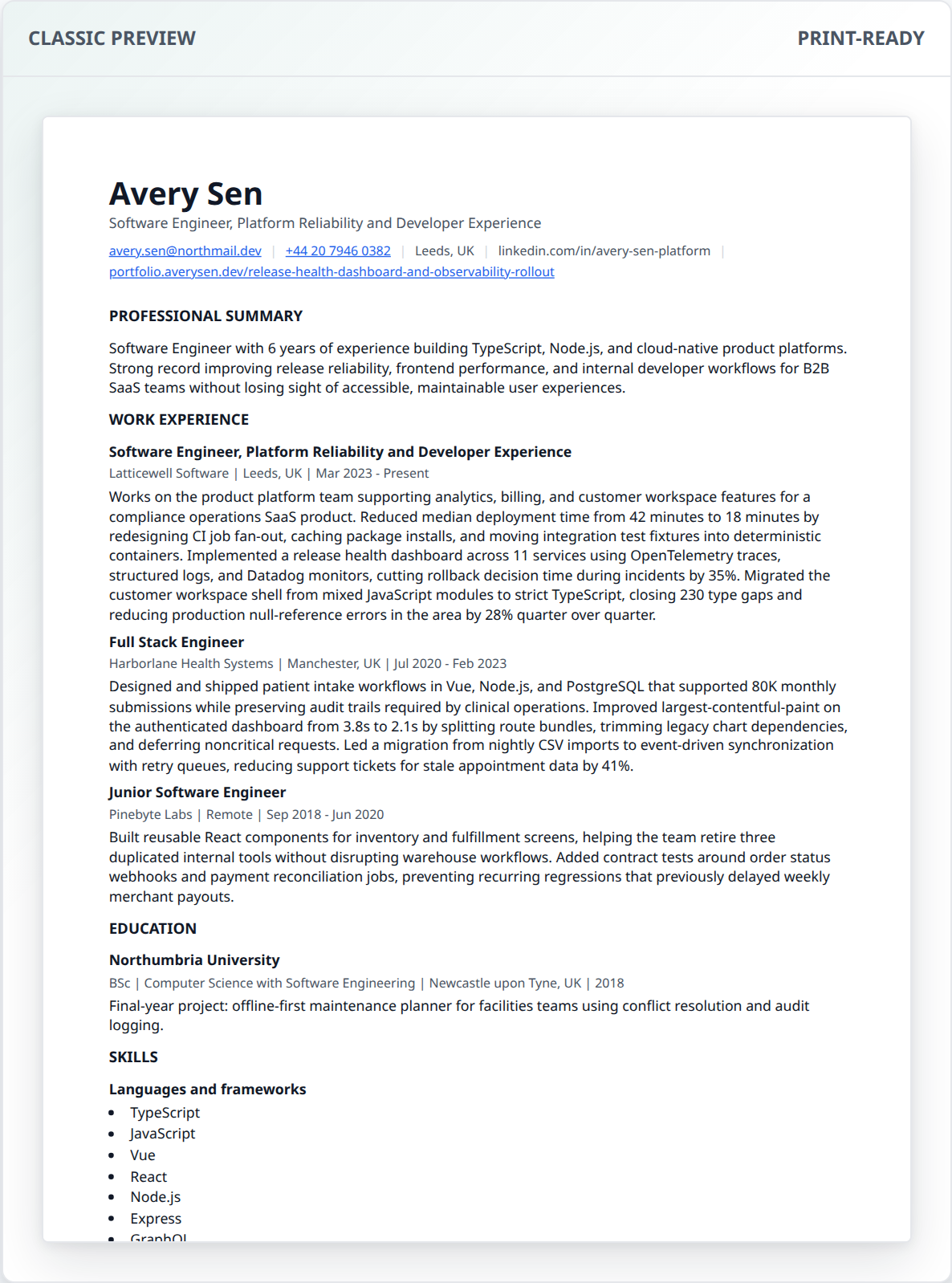
Actual CareerContainer Classic template preview using illustrative sample content. A clear layout can reduce parsing uncertainty, but no template can guarantee a particular ATS result.
Treat risky formatting as a reason to test
| Formatting choice | Conservative recommendation | Why |
|---|---|---|
| Contact details in a page header or footer | Put essential contact text in the document body | Some parsers do not recover header or footer content reliably |
| Text boxes and floating shapes | Use normal document flow for essential content | Floating objects can be extracted out of sequence or skipped |
| Photos or image-based text | Keep application content as selectable text | A parser may not perform image recognition |
| Multi-column tables | Use them only when the extracted sequence remains clear | Cells may be read in an unexpected order |
| Icons without labels | Add the visible text value beside the icon | The icon alone does not communicate the email, phone, or heading |
| Unusual section names | Use a familiar heading or add a clear qualifier | Readers should not have to infer the section’s purpose |
| White text packed with keywords | Never use it | It misrepresents the document and does not help a human reader |
Practical formatting example
Hypothetical layout that has one clear sequence:
MORGAN LEE
morgan@example.com | 555-0100 | Denver, CO

SUMMARY
Financial analyst with experience in forecasting and budget reporting.

EXPERIENCE
Financial Analyst | Example Manufacturing | 2023–Present
- Prepared monthly forecasts and analyzed budget variance in Excel.

EDUCATION
BSc, Finance | Example University | 2023

SKILLS
Excel, Power BI, financial forecasting
The structure is not special because of a particular font or template. It works because the sections, entries, and relationships are explicit. The name and contact details are text, the role stays beside the employer and dates, and skills appear both in context and in a compact list.
How to Match a Resume to a Job Description
Tailoring is not copying the posting into your resume. It is choosing the most relevant truthful evidence and using the employer’s language where it accurately describes your work. CareerOneStop recommends reading the full posting and highlighting terms in the qualifications, skills, and experience sections in its guide to analyzing job postings.
Use this process:
- Mark the required qualifications first: licenses, years or type of experience, location, tools, and core responsibilities.
- Separate the preferred qualifications from the requirements.
- Group repeated ideas. “Monthly forecast,” “budget variance,” and “financial reporting” may belong to one responsibility cluster.
- Compare those ideas with your verified experience. Do not add a skill merely because the posting mentions it.
- Move the strongest relevant evidence into the summary, skills, projects, or experience bullets where it naturally belongs.
- Use the posting’s term alongside a common equivalent when both are accurate—for example, “customer relationship management (CRM).”
- Read the edited resume as a human. Remove repetition and anything you could not explain in an interview.
Illustrative job-description matching example
Suppose a posting says:
Prepare monthly forecasts, analyze budget variance, and build dashboards using Excel and Power BI.
The candidate’s first draft says:
Responsible for reports and spreadsheets.
If the candidate genuinely did the work in the posting, a clearer version could say:
Prepared monthly forecasts and analyzed budget variance in Excel; built Power BI dashboards for department leaders.
The edit includes the job-related terms because they accurately name the work. It does not add “Python,” “CPA,” or a percentage improvement that the candidate cannot prove. The goal is a faithful match, not the largest possible keyword count.
If the application also requests a letter, use the same evidence without repeating the resume line by line. The free cover letter guide and builder explains a simple structure.
PDF vs DOCX: Which Is Better for ATS?
Follow the employer’s instructions first. There is no responsible rule that PDF or DOCX is always better for every application.
| Format | Useful when | Check before submitting |
|---|---|---|
| The application accepts it and you want the page layout to remain fixed | Text is selectable, links work, page breaks are clean, and the file is not a scan | |
| DOCX | The application requests Word or accepts it, and a reflowable document is appropriate | The file opens without repair warnings and the layout remains sensible in a current word processor |
Lever documents parsing for both Microsoft Word and Adobe PDF files. Greenhouse lists .doc, .docx, .pdf, .rtf, and .txt in its supported candidate upload formats. Those examples show that both common formats can be supported; they do not guarantee that every employer accepts both.
A text-based PDF is different from a scanned PDF. A scan may look correct but contain only an image. Conversely, a DOCX file may expose text clearly but reflow when opened with different fonts or software. Test the exact file you plan to upload.
CareerContainer can export the same resume as a browser-generated PDF or an editable DOCX. You can open the free resume builder, compare the files, and keep the format the application requests. No template or file type can guarantee an interview.
Practical ATS Resume Examples
The strongest ATS resume examples are ordinary, clear, and specific. They make relationships explicit instead of relying on decoration.
Example 1: spell out an uncommon abbreviation
Less clear:
Managed QBR preparation for enterprise accounts.
Clearer when the term is relevant:
Prepared quarterly business reviews (QBRs) for enterprise accounts.
This gives software and human readers both versions of the term. You do not need to spell out universally familiar terms in every bullet; use judgment for your field.
Example 2: place a skill in context
Skills list only:
SQL, Tableau, stakeholder communication
Experience evidence:
Queried support data in SQL and built a Tableau dashboard used in monthly service reviews.
Both lines can appear in the same resume if they are true. The skills section supports fast scanning; the bullet shows how the candidate used those skills.
Example 3: keep dates and roles together
Harder to interpret after extraction:
2021–2023
2023–Present
Example Company
Senior Analyst
Analyst
Clearer:
Example Company
Senior Analyst | 2023–Present
Analyst | 2021–2023
All names and details in these examples are hypothetical. Replace them with accurate information from your own work. The common resume mistakes guide has more before-and-after checks.
How to Test Resume Readability
You cannot reproduce every employer’s ATS at home, but you can catch basic extraction and reading-order problems with a copy-paste test. Lever’s documentation suggests highlighting text as a quick way to check whether a file is likely parseable.
The copy-paste readability test
- Export the final PDF or DOCX in the format requested by the application.
- Open that exported file—not the editor preview.
- Select from the first character of your name through the end of the last section. If selecting the whole file is difficult, test the contact line, first job, education, and skills separately.
- Copy the selection.
- Paste it into a plain-text editor. Use an app that removes visual styling rather than another rich-text document.
- Read from top to bottom. Check that your name comes first, contact details are present, headings precede their content, each role stays near its employer and dates, and bullets have not moved into another section.
- Search the pasted text for two or three required skills that you genuinely included.
- Return to the visual file and check type size, links, page breaks, clipped lines, and blank pages. Plain-text extraction does not test visual quality.
An extraction such as this deserves another look:
Python SQL 2022–Present Product Analyst
Skills Experience
A clearer sequence would be:
EXPERIENCE
Product Analyst | Example Company | 2022–Present
- Built weekly SQL reports...

SKILLS
Python, SQL, Tableau
This is a readability test, not an ATS score or a promise that every platform will produce the same output. Also review any fields the application autofills from your resume and correct them before submitting.
Common ATS Resume Myths
Myth: Every ATS automatically rejects a badly formatted resume
A file can fail to parse fully, but rejection is a separate action. Some employers configure rules for answers to application questions; recruiters may also review attached files manually. Do not treat every rejection as evidence of a formatting problem.
Myth: Every two-column resume fails
Columns are a documented source of parsing trouble in some products, so a single column is the conservative default. A two-column resume is not automatically unreadable. Test the extracted order and use a simpler version when you cannot accept the added uncertainty.
Myth: PDF is always better than DOCX
Several current ATS vendors document parsing for both formats. A text-based PDF can preserve layout, while a DOCX may be requested by the employer. Follow the application instructions and test the exact file you plan to send.
Myth: Repeating a keyword guarantees a higher ranking
Recruiter search, rules, and matching tools operate differently. Repetition cannot replace a required qualification or credible evidence. Use relevant terms naturally and only when they are true.
Myth: An ATS-friendly template guarantees interviews
A template can provide a clear reading order and sensible headings. It cannot supply missing qualifications, control an employer’s configuration, or determine whether a recruiter offers an interview.
Frequently Asked Questions
Can ATS read a two-column resume?
Some systems can, but capabilities and reading order vary. Keep essential experience in a clear sequence, perform the copy-paste test, and use a single-column version when you want the conservative option.
Is a PDF resume ATS-friendly?
A text-based PDF can be ATS-readable, and several vendors document PDF parsing. Follow the employer’s file instructions and avoid image-only scans.
How can I check whether my resume is readable by ATS?
Copy the exported file into a plain-text editor. Check that contact details, headings, roles, dates, and bullets appear in a sensible order, then review any fields the application autofills.
Do ATS systems automatically reject resumes?
Not universally. Employers may configure screening rules, use optional matching tools, or review resumes manually. A parsing problem and an automatic rejection are separate events.
Sources and Review Scope
This guide was reviewed on November 1, 2026 against current guidance from the US Department of Labor, CareerOneStop, UC Berkeley Career Engagement, Greenhouse Support, and Lever Help. Vendor documentation is used to illustrate differences between products, not to describe every ATS or employer configuration.
All resume and job-description examples are hypothetical. CareerContainer does not claim that a template, keyword, score, or file format guarantees parsing, ranking, an interview, or a job offer.